
🕑 Reading time: 1 minute
Locating underground utilities has always been one of the most challenging and risky parts of construction. Striking an unseen gas line or damaging an electrical conduit can lead to costly delays, safety hazards, and legal complications. Traditional survey drawings and utility maps often fail to reflect on-site conditions accurately.
This is where Augmented Reality (AR) Mapping is transforming how engineers visualize and manage subsurface infrastructure.

This article explains what AR mapping is, how it works for underground utility visualization, the equipment and software required, and how engineers can practically use it on-site to improve safety, coordination, and decision-making.
What is AR Mapping in Construction?
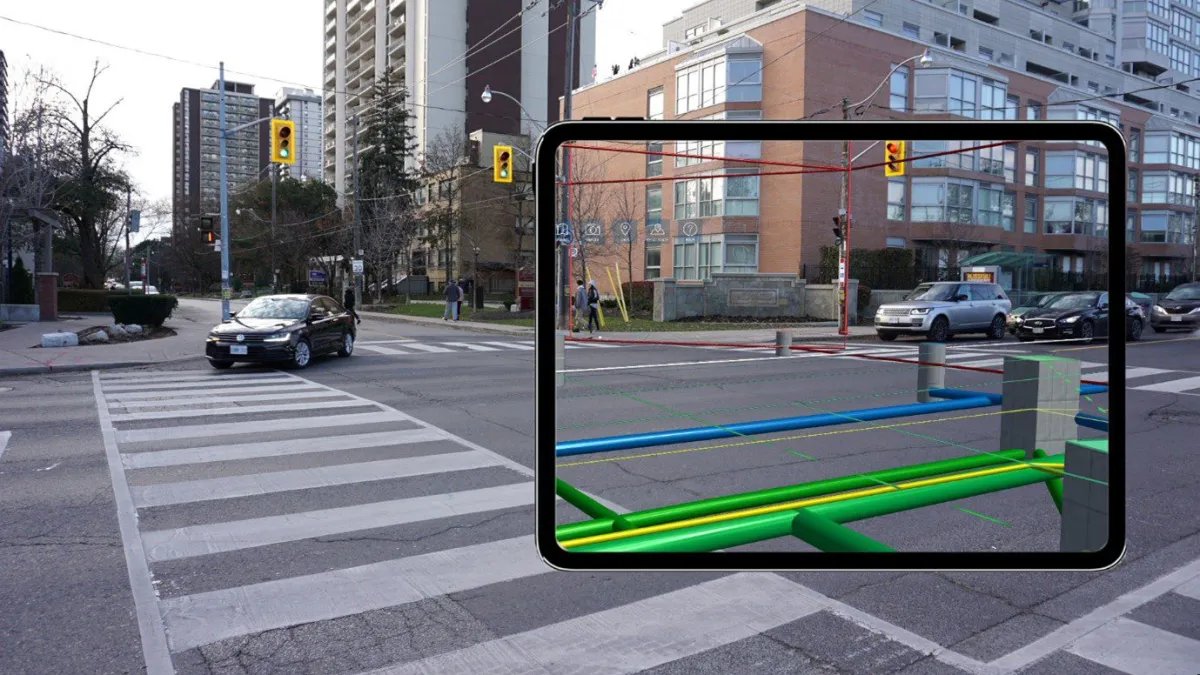
Augmented Reality (AR) combines real-world views with digital information overlays. In construction, AR mapping integrates geospatial data, 3D utility models, and real-time location tracking into a live camera view. It allows engineers to “see” underground utilities such as pipelines, cables, and ducts- directly on a tablet or smartphone screen.
Instead of reading 2D maps or CAD plans, engineers can walk on site and view where each buried utility runs beneath their feet, with each utility color-coded, labeled, and scaled to its actual position.
How AR Mapping Works?
AR utility visualization relies on four main technologies working together:
- Geospatial Utility Data – Accurate GIS or BIM data showing the coordinates, depth, and type of buried utilities (e.g., water, power, telecom, sewer).
- GNSS/GPS Positioning – Satellite-based positioning ensures the AR display matches on-site real-world locations.
- Mobile Device with AR Capability – A smartphone, tablet, or AR headset equipped with a camera and motion sensors.
- AR Software Engine – The app aligns digital utility models to physical coordinates, updating the display as the user moves.
When a site engineer points the device’s camera toward the ground, the AR software superimposes 3D models of utilities in real time. Each utility, such as a water main or electrical duct, appears as a colored line or pipe hovering exactly over its underground location.

Step-by-Step: How to Visualize Underground Utilities Using AR Mapping
1. Collect and Prepare Utility Data
- Gather existing GIS, CAD, or BIM utility data from previous surveys, contractors, or government databases.
- Ensure each utility layer (electric, water, gas, sewer, telecom) includes coordinate and depth information.
- Clean and standardize the data format, as most AR mapping apps accept GeoJSON, DWG, or BIM IFC files.
2. Import Data into AR Mapping Software
Load your utility dataset into an AR mapping platform such as:
- vGIS Utilities
- Trimble SiteVision
- Esri ArcGIS Field Maps with AR add-ons
- Augview
- Spectar AR for BIM models
These tools convert 2D utility maps into 3D geo-referenced models that can be viewed in real space.
3. Calibrate Positioning
- Use a high-precision GNSS receiver or a compatible survey-grade antenna with your mobile device.
- Calibrate the AR environment by aligning known site landmarks or reference points to ensure the AR model matches real-world coordinates exactly.
4. Visualize in Real-Time
- Walk through the site holding the device in front of you.
- You’ll see live overlays of underground utilities as colored 3D lines, labeled with type, depth, material, and owner information.
- The app updates as you move, allowing you to “look through the ground” to see how utilities intersect, cross, or run parallel to one another.
5. Capture, Annotate, and Share
- You can capture screenshots, add notes, and create issue tags directly in the app.
- These annotated AR visuals can be shared instantly with design or excavation teams for coordination and verification.
Benefits of AR Mapping for Underground Utilities
1. Improved Safety
Knowing the exact position of buried utilities before excavation prevents accidental strikes. This drastically reduces risk to workers and the public.
2. Accurate Utility Coordination
Designers and site engineers can verify the relationship between utilities and new works in real space, minimizing clashes and costly rerouting.
3. Time and Cost Savings
Field teams no longer rely on outdated drawings or multiple survey visits. One on-site AR scan can confirm the position of all services.
4. Better Communication
AR visuals are easy for everyone to understand, from contractors to clients, eliminating confusion from complex utility drawings.
5. Integration with BIM and GIS
Modern AR mapping tools integrate directly with BIM and GIS databases, enabling the creation of a digital twin of underground infrastructure. This allows long-term asset management and future project planning.
AR Mapping Equipment and Software
| Component | Example | Purpose |
| AR-capable mobile device | iPad Pro / Android tablet with ARCore | Displays augmented visuals |
| GNSS Receiver | Trimble R2, Leica GG04 Plus | Provides high-accuracy positioning |
| AR Mapping App | vGIS, Trimble SiteVision, Augview | Processes data and overlays models |
| Utility Data Source | GIS / CAD / BIM files | Provides location and depth data |
| Cloud or Project Database | ArcGIS Online / Autodesk Construction Cloud | Stores and shares field data |
Field Accuracy Tips
- Use survey-grade GNSS equipment for accurate alignment (±5 cm or better).
- Always cross-check AR data with existing utility markings before excavation.
- Perform field calibration using known control points or visible features.
- Avoid using AR during heavy cloud cover or under metal roofs — GPS signals can weaken.
- Regularly update GIS/BIM data when new utilities are installed or rerouted.
Common Challenges and Solutions
| Challenge | Explanation | Solution |
| Inaccurate utility data | Outdated or incomplete GIS data leads to mismatched visuals | Verify datasets with recent as-built surveys |
| Signal interference | Poor GPS accuracy in urban canyons | Use GNSS receivers with RTK correction |
| Device calibration drift | AR alignment may shift over time | Recalibrate frequently using known points |
| Limited visibility in bright sunlight | AR visuals fade outdoors | Use high-brightness screens or AR headsets |
FAQs
1. What is the accuracy of AR utility mapping?
With survey-grade GNSS, AR mapping can achieve positional accuracy within 2–5 cm. Accuracy depends on the quality of the input GIS data and on on-site calibration.
2. Can AR mapping replace ground-penetrating radar (GPR)?
Not yet. AR mapping visualizes known utility data, while GPR detects unknown or undocumented utilities. The best results come from using both together.
3. What is the main advantage of AR mapping for site engineers?
It allows engineers to instantly visualize buried utilities in the field, improving coordination, safety, and decision-making, without complex 2D drawings.
Source link